
Data Structures are specific ways of organising data and storing data; so that it can be accessed and worked with in an efficient way.
Data structures in Python
In this article we will talk about the most widely used data structures in python which will cover most of the use-cases we encounter:
- Tuple
- List
- Dictionary
- Set
- String
Tuple:
- Tuple is an ordered sequence of items same as list.The only difference is that tuples are immutable. Tuples once created cannot be modified.
- It is defined within parentheses () where items are separated by commas.
- The main differences between lists and tuples are: List elements and size can be changed, while tuples cannot be updated.
- Tuples can be thought of as read-only lists.
t = (5,'program', 1+3j)

# t[1] = 'program'
print("t[1] = ", t[1])

# t[0:3] = (5, 'program', (1+3j))
print("t[0:3] = ", t[0:3])

# Generates error
# Tuples are immutable
t[0] = 10
List:
- List is an ordered sequence of items. It is one of the most used datatype in Python and is very flexible.
- All the items in a list do not need to be of the same type.
- Lists are enclosed in brackets ( [ ] ) .
a = [5,10,15,20,25,30,35,40]

# a[2] = 15
print("a[2] = ", a[2])

# a[0:3] = [5, 10, 15]
print("a[0:3] = ", a[0:3])

# a[5:] = [30, 35, 40]
print("a[5:] = ", a[5:])
Some more list examples.
list = [ 'abcd', 786 , 2.23, 'john', 70.2 ]
tinylist = [123, 'john']

print(list)          # Prints complete list
print(list[0])       # Prints first element of the list
print(list[1:3])     # Prints elements starting from 2nd till 3rd
print(list[2:])      # Prints elements starting from 3rd element
print(tinylist * 2)  # Prints list two times
print(list + tinylist) # Prints concatenated lists
Dictionary:
- Dictionary is an unordered collection of key-value pairs.
- It is generally used when we have a huge amount of data. Dictionaries are optimized for retrieving data. We must know the key to retrieve the value.
- In Python, dictionaries are defined within braces {} with each item being a pair in the form key:value. Key and value can be of any type.
d = {1:'value','key':2}
print(type(d))

print("d[1] = ", d[1]);
print("d['key'] = ", d['key']);

dict = {}
dict['one'] = "This is one"
dict[2]     = "This is two"

tinydict = {'name': 'john','code':6734, 'dept': 'sales'}

print(dict['one'])       # Prints value for 'one' key
print(dict[2])           # Prints value for 2 key
print(tinydict)          # Prints complete dictionary
print(tinydict.keys())   # Prints all the keys
print(tinydict.values()) # Prints all the values
Set:
- A set is an unordered collection of items. Every element is unique (no duplicates) and must be immutable (which cannot be changed).
- However, the set itself is mutable. We can add or remove items from it.
- Sets can be used to perform mathematical set operations like union, intersection, symmetric difference etc.
- Set operations are: union, intersection, symmetric difference, subset
# set of integers
my_set = {1, 2, 3}
print(my_set)

# set of mixed datatypes
my_set = {1.0, "Hello", (1, 2, 3)}
print(my_set)


# set do not have duplicates
# Output: {1, 2, 3, 4}
my_set = {1,2,3,4,3,2}
print(my_set)

# initialize my_set
my_set = {1,3}
print(my_set)

# add an element
# Output: {1, 2, 3}
my_set.add(2)
print(my_set)

# add multiple elements
# Output: {1, 2, 3, 4}
my_set.update([2,3,4])
print(my_set)
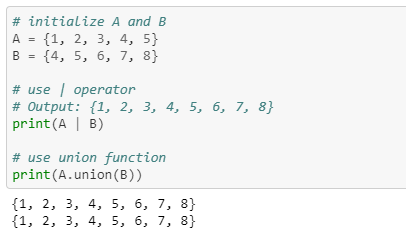
Set Union
- Union of A and B is a set of all elements from both sets.
- Union is performed using | operator. Same can be accomplished using the method union().
Set Intersection:
- Intersection of A and B is a set of elements that are common in both sets.
- Intersection is performed using & operator. Same can be accomplished using the method intersection().

Set Difference:
- Difference of A and B (A – B) is a set of elements that are only in A but not in B. Similarly, B – A is a set of element in B but not in A.
- Difference is performed using – operator. Same can be accomplished using the method difference().

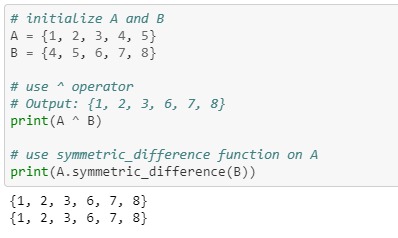
Set Symmetric Difference:
- Symmetric Difference of A and B is a set of elements in both A and B except those that are common in both.
- Symmetric difference is performed using ^ operator. Same can be accomplished using the method symmetric_difference().
String:
- String is sequence of Unicode characters. We can use single quotes or double quotes to represent strings.
- Multi-line strings can be denoted using triple quotes, ”’ or “””.
- Subsets of strings can be taken using the slice operator ([ ] and [:] ) with indexes starting at 0 in the beginning of the string and working their way from -1 at the end.
myStr = 'Hello World!'

print(myStr)          # Prints complete string
print(myStr[0])       # Prints first character of the string
print(myStr[2:5])     # Prints characters starting from 3rd to 5th
print(myStr[2:])      # Prints string starting from 3rd character
print(myStr * 2)      # Prints string two times
print(myStr + "TEST") # Prints concatenated string
Output:
Hello World!
H
llo
llo World!
Hello World!Hello World!
Hello World!TEST

 Purnananda Behera
Leave a comment