
Imagine you have a super-smart assistant who can answer questions and solve problems but can’t access the real world or use any tools outside of what it already knows. Now think giving that assistant a special key to unlock things like the internet, your files, or apps you use. That’s where the Model Context Protocol (MCP) comes in. MCP introduced by Anthropic in November 2024, it works as a universal tool to help AI systems, especially Large Language Models (LLMs), connect to the world in a simple and effective way. This article will explain what MCP is, how it’s different from regular LLMs and those with extra features, and guide you step-by-step—from simple terms anyone can understand.
What is MCP?
MCP is a set of rules (a protocol) that lets AI connect to tools and data sources (like emails, calendars, or weather apps) without needing to learn each one individually. Think of it as a universal remote control: it allows any AI to interact with any tool, as long as both understand MCP. MCP acts like a universal connector or you can say USB-C for AI, providing a single interface that links AI applications to various tools, data sources, or APIs.
Understanding Plain LLM, LLM with Connectors, and LLM with MCP
1. Plain LLM (The Isolated Librarian)
A plain large language model (LLM) like ChatGPT is like a librarian who knows every book in their library but can’t access the outside world. It’s trained on vast datasets up to a specific date, so it can’t answer questions about recent events, personal data (like your emails), or real-time information (e.g., today’s weather). Its knowledge is frozen in time, making it powerful for general tasks but limited for dynamic needs.
2. LLM with Connectors (The Librarian with a Custom Toolbox)
Connectors add basic external access. Imagine giving the librarian a toolbox, but each tool only works for one job—like a weather app or email client. Each connection requires custom code (e.g., APIs or plugins), which is time-consuming and unscalable. For example, linking an LLM to Google Calendar and a weather API means writing two unique integrations. This creates a messy “M×N problem”: connecting M LLMs to N tools requires M×N custom solutions.
3. LLM with MCP (The Librarian with a Universal Smartphone)
MCP solves this problem. It’s like giving the librarian a smartphone with an app store: any MCP-compatible tool (weather, email, cloud storage) works instantly. MCP standardizes how LLMs interact with tools, using universal schemas (like JSON) for requests and responses. Instead of custom code for every integration, tools and LLMs only need to “speak” MCP once. This reduces the M×N problem to M+N and enables real-time, bidirectional communication.
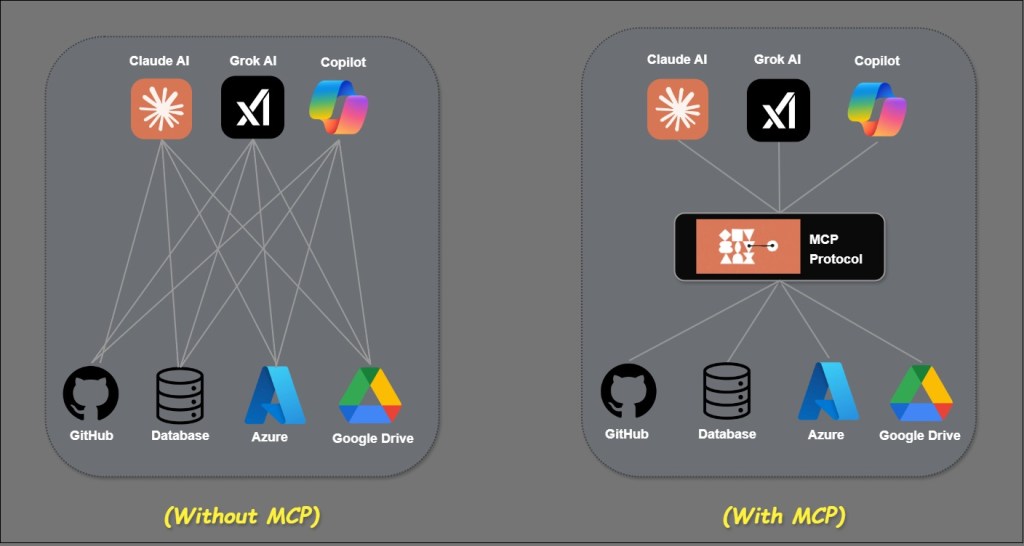
Why It Matters?
Basic LLMs have their limits, and connectors can be tricky to use. MCP provides a standardized way for LLMs to easily connect to any tool or data source, making them much more versatile and efficient.
Understanding the MCP Architecture
MCP follows a client-server architecture where a host application can connect to multiple servers.
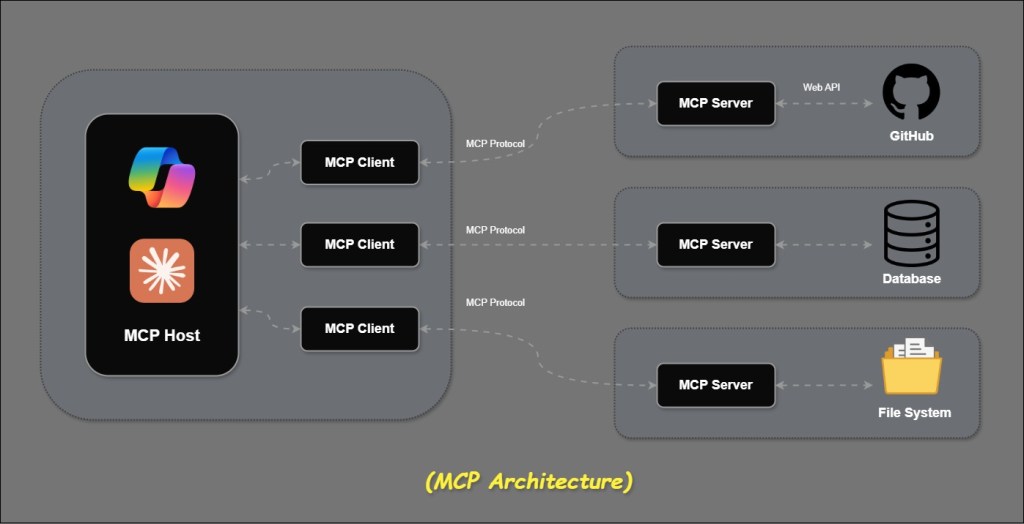
MCP Hosts: AI Agents such as Claude Desktop, Copilot, IDEs, or AI tools that leverage MCP to access data.
MCP Clients: Clients that establish one-to-one connections with servers to facilitate communication. It acts as an intermediary, translating requests from the MCP Host and delivering responses from the MCP Server.
MCP Servers: Lightweight applications that provide specific functionalities through the standardized Model Context Protocol.
Tools: MCP servers can securely interact with local resources like files, databases, and services on your computer, as well as connect to external systems like GitHub, Weather API, and similar services accessible over the internet via APIs.
How Does MCP Work? A Step-by-Step Example
Let’s walk through a real-world scenario to see MCP in action, keeping it simple at first, then adding technical details.
A Layman Perspective: Asking “What’s the Weather Like?”
- You Ask: You’re chatting with an AI app (like Chat GPT) and say, “What’s the weather in Mumbai today?”
- AI Thinks: The AI knows it doesn’t have weather info in its head, but it has MCP—a way to ask for help.
- MCP Connects: The app (the “host”) uses MCP to check what tools are available. It finds a weather server (an MCP server) that can fetch weather data.
- Tool Runs: The AI tells the weather server, “Get me Mumbai’s weather.” The server talks to a weather API and comes back with, “It’s 80°F and rainy.”
- AI Answers: The AI takes that info and says, “It’s 80°F and rainy in Mumbai today.”
With MCP, the AI didn’t need a custom weather plugin—it just used a standard “MCP weather app” that anyone could build and share.
Developer Perspective: The Technical Flow
- User Input: The query “What’s the weather in Mumbai today?” is sent to the MCP host (e.g., Chat GPT or a custom app with an embedded LLM).
- Tool Discovery: The host’s MCP client queries connected MCP servers via the protocol’s
tools/listendpoint. The response might be:
{
  "tools": [
    {
      "name": "get_weather",
      "description": "Fetches current weather for a location",
      "inputSchema": {
        "type": "object",
        "properties": { "location": { "type": "string" } },
        "required": ["location"]
      }
    }
  ]
}
3. LLM Decision: The host sends the user query and tool list to the LLM. The LLM, trained for function-calling, responds with:
{
  "tool_calls": [
    {
      "function": {
        "name": "get_weather",
        "arguments": { "location": "Mumbai" }
      }
    }
  ]
}
4. Execution: The MCP client forwards this to the weather MCP server, which executes the get_weather tool (e.g., via an API call to OpenWeatherMap). The server returns:
{
  "temperature": 80,
  "condition": "rainy"
}
5. Response: The LLM incorporates this into a natural language reply: “It’s 80°F and rainy in Mumbai today.”
In summary, I covered what MCP is, why it matters, the problem it solves with LLM, and provided a high-level overview of its usage.
In my next article, I willl show you how to build an MCP Server using the MCP Server SDK. We’ll connect it to a real-world application and take it a step further by integrating it with an AI Agent.


 Purnananda Behera
Leave a comment